🧠 The Two‑AI Coding Workflow: One to Build, One to Explain
TL;DR
Most people try to make one AI do everything.
You’ll get better results — and actually understand your code — if you split the work:
- AI #1 (Builder): writes and edits code
- AI #2 (Interpreter): reads your whole project and explains it back to you
This workflow gives you speed and clarity, whether you’re learning, shipping, or vibe‑coding.
Rule of thumb: Let one AI write the code — and another AI explain it.
On this page, you’ll learn:
- why using two AIs (a Builder and an Interpreter) improves clarity
- how the workflow works in practice
- how beginners, developers, and vibe‑coders can use it
AI coding tools are incredible — until you realize you don’t understand the code they just wrote.
One minute you’re generating entire features in minutes.
The next, you’re staring at a codebase you barely recognize.
This is the hidden cost of AI‑accelerated development: speed without understanding.
But there’s a fix — and it’s surprisingly simple:
Use two AIs instead of one.
- One AI to build your code.
- One AI to explain your code.
This approach is often called the two‑AI coding workflow, the builder/interpreter pattern, or the dual‑AI coding loop.
This “two-layer workflow” is becoming the new normal for developers who want speed and clarity — from beginners learning to code to developers shipping features and vibe-coders building fast without losing the plot.
🔧 Layer 1 — The Builder AI
This is the AI that writes code, edits files, scaffolds projects, and moves fast.
Examples:
- Claude Code
- Cursor
- GitHub Copilot
- Aider
- Gemini Code Assist
- Local coding agents
Optimized for:
- generating new code
- modifying existing code
- navigating your project
- automating repetitive tasks
- building features quickly
Builder AIs give you momentum — but not always understanding.
📘 Layer 2 — The Interpreter AI
This AI doesn’t build. It explains. It grounds. It keeps you oriented.
Examples (simple, accessible options):
- Notebook‑style tools that let you upload files
- Chatbots with “knowledge bases” or “custom instructions”
- Any AI that can read multiple files at once
- Any tool that can ingest your whole project (large context window)
💡 What to look for in an Interpreter AI:
- Can it read multiple files at once?
- Can it ingest your entire project (large context window)?
- Does it answer only from your files?
- Does it cite where answers come from?
Think of it as your personal code librarian — the one who remembers everything you’ve built and explains it back to you without guessing.
🔄 The Workflow at a Glance
The workflow looks like this:
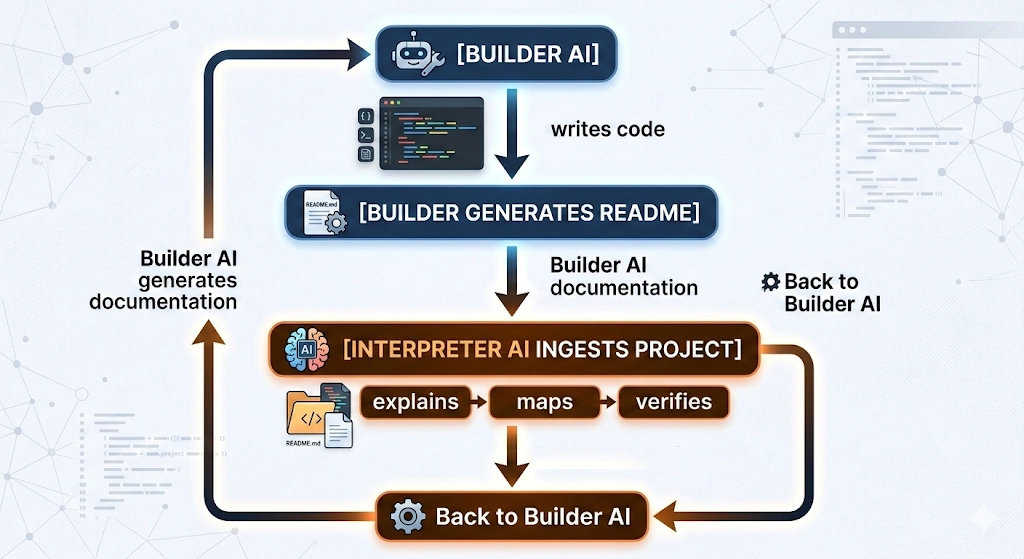
A simple loop:
Build → Document → Interpret → Improve.
🧰 Example Pairings
Here are a few simple ways people use the two‑AI workflow:
Builder → Interpreter
- Claude Code → NotebookLM
- Cursor → ChatGPT with project files
- GitHub Copilot → Claude project upload
- Aider → Gemini Advanced
The exact tools don’t matter.
The pattern does.
🧠 Why This Works
This workflow separates generation from analysis — two very different tasks.
Builder AIs are optimized to produce code quickly, but that speed can hide assumptions or complexity.
Interpreter AIs are better at reading and reasoning about code when they aren’t also trying to generate it.
By splitting those roles, you get both strengths: fast creation and careful explanation.
It’s the same principle used in good engineering teams — one person builds, another reviews.
🚀 What You Gain from the Two-AI Workflow
1. You get grounded explanations instead of hallucinations
Interpreter AIs focus on your codebase instead of general knowledge — which makes their explanations far more grounded and reliable.
2. You build a “living manual” as you code
The Builder writes the docs.
The Interpreter helps you search them.
You get clarity for free.
3. You keep control of your codebase
You move fast without losing the plot — especially important for vibe‑coders and solo developers.
Want to see a real‑world example of this pattern in action?
XDA recently published a walkthrough showing how a developer paired two different AI tools to build fast and stay oriented in their codebase. It’s optional reading, but it’s a good illustration of how powerful this workflow can be in practice.
👉 https://www.xda-developers.com/paired-notebooklm-with-claude-code/
🧪 A Real‑World Example
You’ve vibe-coded a webpage with a login, and now you want to understand how the login logic actually works.
You:
“Explain how the login flow works in this project.”
Interpreter AI:
“auth.js handles credential validation.
routes/login.js calls validateUser().
If successful, it sets a session cookie via session.js.
Here’s the full request path…”
You:
“Great — where are the weak points?”
Interpreter AI:
“You have no rate limiting, and failed logins aren’t logged.
Also, validateUser() trusts the email format without sanitizing it.”
This is the kind of clarity you never get from a Builder AI alone.
👶 For Beginners: Learn While You Build
AI can feel like cheating — or like you’re not learning anything.
The two‑AI workflow fixes that.
How beginners should use it:
- Build with your Builder AI.
- Ask it to generate a README explaining the project.
- Upload the README + code into your Interpreter AI.
- Ask questions like:
- “Explain this file in plain English.”
- “How do these functions connect?”
- “What should I learn next?”
Why it works:
You get speed and a grounded tutor who never makes things up.
👨💻 For Developers: Keep Control of Your Codebase
If you’re already a developer, the risk isn’t learning — it’s losing the plot.
The two‑AI workflow helps you:
- maintain architectural clarity
- prevent silent regressions
- document as you go
- onboard yourself to AI‑generated changes
- avoid “black box” features
Developer‑specific moves:
- After each major change, ask your Builder AI for a diff summary.
- Feed that summary into your Interpreter AI for verification.
- Use the Interpreter AI to map dependencies and interactions.
- Before merging, ask:
- “What are the risks in this change?”
- “Does this introduce hidden coupling?”
💡 Interpreter AIs are often better reviewers than Builder AIs.
They aren’t “biased” by the logic they just wrote — they read your code like a fresh engineer.
🎧 For Vibe‑Coders: The Safety Net You Didn’t Know You Needed
Vibe‑coding is fun, fast, creative — and chaotic.
The two‑AI workflow gives you:
- a grounded explainer
- a way to trace what you built
- a way to understand your own vibes
- a way to clean up after a long session
The vibe‑coder loop:
- Build fast with your Builder AI.
- Generate a README or architecture summary.
- Drop everything into your Interpreter AI.
- Ask:
- “What did I just build?”
- “Where are the weak points?”
- “What should I refactor next?”
It’s like vibe‑coding with a seatbelt.
🧩 Putting It All Together
1. Build with AI #1 (The Builder)
Generate code, modify files, scaffold features.
2. Document with AI #1
Ask it to produce:
- a README
- architecture notes
- dependency maps
- “explain this project like I’m new here” summaries
3. Upload everything to AI #2 (The Interpreter)
Let it read your files and answer grounded questions.
4. Ask clarifying questions
- “What does this function do?”
- “How do these modules interact?”
- “What assumptions is this code making?”
- “Where are the risks?”
5. Repeat as needed
Each cycle makes your code clearer — and your workflow calmer.
❓ Common Questions
Do I need two separate apps to use this workflow?
No — you can use any combination of tools, as long as one builds and one explains.
Can I use the same AI model for both roles?
Yes, as long as you separate the tasks. The key is the workflow, not the brand.
Does this work for beginners?
Absolutely — it’s one of the fastest ways to learn how code actually works.
🧭 Next Steps
- Build something quickly: Experiment with AI-assisted prototyping in Vibe-Coding.
- Learn how programs work: See how to read and reason about code in Understanding Code.
- Create your own features: Use AI to help write functions and logic in Writing Code.
- Starting from scratch? Begin with Getting Started with AI Coding.
- Set up your environment: Pick the right tools in Tools for Coding.
- Use AI responsibly: Review the essentials in AI Safety Basics.
- Get better results from AI: Improve your prompting in How to Talk to AI.