🤖 AI Automation in Practice
Most people use AI for one-off tasks. We use it to build Systems. This page serves as a “Living Lab” where we document the actual automations we use to keep this ecosystem high-signal and low-friction.
Below are the real-world automations we use every day to keep this site running smoothly.
AI isn’t magic — it’s a system you can build.
🛡️ Case Study 1: The Security Triage Bot
Maintaining the AI Security Watchlist
Keeping up with security news is a full-time job. To avoid the “maintenance treadmill,” we built a Triage Bot that handles the heavy lifting.
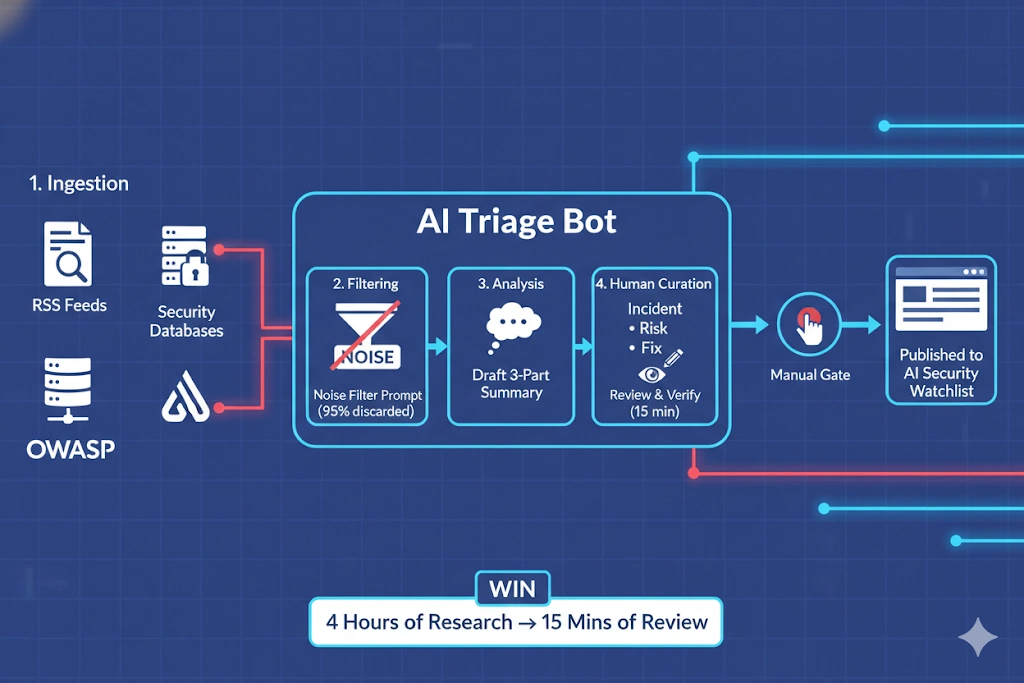
The System Architecture:
- Ingestion: A bot monitors 20+ high-signal security RSS feeds and databases.
- Filtering: Using a “Noise Filter” prompt, the AI discards 95% of the entries (hype and redundant news).
- Analysis: For the remaining 5%, the AI drafts a three-part summary: The Incident, The Risk, and The Fix.
- Human Curation: We review the AI’s draft, verify the sources, and push the update.
The Win: 4 hours of weekly research reduced to 15 minutes of expert review.
🏗️ Case Study 2: The Thought-to-Task Pipeline
Turning “The Cognitive Dump” into actionable results.
Capture is easy; sorting is hard. We use a bridge automation to turn messy voice notes or raw brain dumps into structured tasks.
The System Architecture:
- The Input: A raw voice-to-text transcription or a messy mobile note.
- The Logic: The AI analyzes the text to identify “Action Items” (tasks), “Context” (notes), and “Deadlines.”
- The Bridge: The AI automatically pushes the formatted result to a task manager or project folder.
The Win: Zero “mental friction” between having an idea and starting the work.
🧱 The Automation Framework
Every automation we build follows the same repeatable pattern: A Loop, a Rule, and a Bridge — simple enough to scale, powerful enough to save hours.
- Identify the Loop: What task do you do every day or every week? (The Input).
- Isolate the Rule: Can you explain the “logic” of the task to a 10-year-old? (The AI Prompt).
- Choose the Bridge: Use a tool like Make.com, Zapier, or n8n to connect your apps. (The Connection).
🛠️ Ready to Build?
Automation is the transition from being an AI User to an AI Architect. Use these resources to start building your own high-impact pipelines:
- The Skillset: Build AI Agents & Custom GPTs to handle specific logic loops.
- The Methodology: Understand the Mastery Trilogy → that anchors the Mobile, Desktop, and Cognitive pillars.
- The Tools: Use our curated Best AI Tools list to find the apps with the best API and automation support.
- The Blueprint: Apply these systems to your 10-Hour Win → to reclaim 10+ hours of your week.
Pro Tip: - Use AI-assisted PowerShell scripting to bridge the gap between cloud AI and your local Windows files.
Together, these elements give you the foundation to build high‑impact automations tailored to your life, your tools, and your repeatable loops.
⚠️ A quick note
Automation is a force multiplier, but it requires Human Oversight. We never allow AI to publish directly to the site without a “Manual Gate.” Accuracy is the anchor of a high-signal system.