Local LLM Hardware: GPU VRAM vs. Unified Memory
Most local‑AI hardware advice stops at one question: “How many tokens per second can this card push?”
That’s the wrong question if you run more than one model.
This guide is for anyone past the “one chatbot on one GPU” stage — you’re building a pipeline, an agent, a Discord bot, or anything that calls multiple models over the course of a session. At that point, raw throughput stops being the metric that decides which machine wins.
New to local AI? Start with Local AI Setup for Busy Humans and Local-First AI Mastery first — this page assumes you’ve already got a model running and are now deciding what to build next.
TL;DR
- Dedicated GPU VRAM (NVIDIA RTX cards) wins on raw tokens/sec, every time, for a single resident model.
- Unified memory (Apple Silicon, AMD Strix Halo, and the pending NVIDIA RTX Spark platforms) wins when your workload needs several models resident at once, because it avoids repeated load/unload cycles.
- The real question isn’t “how fast is the GPU?” — it’s “how many models can I keep hot, and how often does my workload switch between them?”
- If you run one model hard all day (one coding model, all day), buy VRAM.
- If you run a pipeline — planning → research → coding → review, each on a different model — unified memory can win even at half the raw speed.
- NVIDIA RTX Spark (expected late 2026) is worth waiting on if your build timeline allows — it’s NVIDIA’s unified-memory answer aimed squarely at this exact multi-model gap.
🧠 The Core Idea: Two Different Kinds of “Fast”
Every local AI benchmark you’ve seen compares raw generation speed:
“5070 Ti: 80 tok/s vs. Apple Silicon: 30 tok/s”
That comparison is real, but it only measures the machine while it’s actively generating. It says nothing about what happens between requests — and for most real workloads, that’s where the time actually goes.
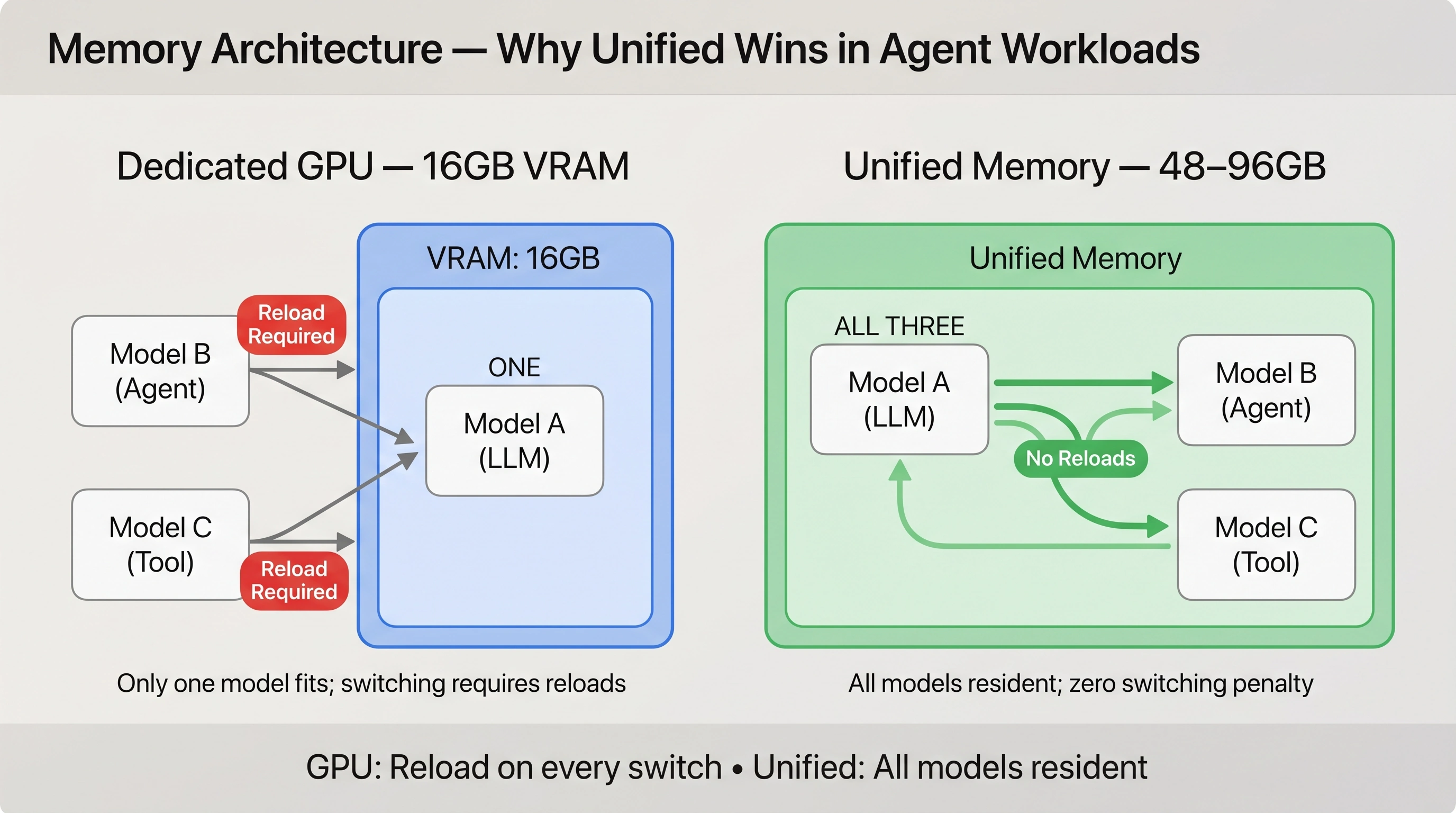
A dedicated GPU has fast compute but limited, fixed VRAM. If your active model doesn’t fit alongside the others you need, the engine has to unload one model and load another — and that load time can run anywhere from a few seconds to well over ten, depending on model size and disk speed.
A unified-memory machine has slower raw compute per model, but a much larger single memory pool shared between CPU and GPU. That means several mid-sized models can sit resident simultaneously, with no load/unload penalty between them.
Neither architecture is “better.” They’re optimized for different shapes of workload.
📊 The Two Architectures at a Glance
| Dedicated GPU (VRAM) | Unified Memory (Apple Silicon / Strix Halo / RTX Spark) | |
|---|---|---|
| Raw tok/s on one model | Highest | Lower — typically 40–60% of a comparable GPU |
| Memory pool | Fixed, smaller (12–32GB on most consumer cards) | Large, shared with system (up to 128GB+ on some platforms) |
| Models resident at once | Usually 1, sometimes 2 if small | 3+ mid-sized models simultaneously |
| Model-switch cost | High if VRAM is full — full reload | Near zero if models already fit in memory |
| Best workload shape | One model, sustained, heavy generation | Pipelines that rotate between several models |
| Power / noise | Higher under sustained load | Generally quieter, more efficient per token |
🖥️ 2026 Platform Snapshot
Model names and specific specs shift fast in this space — treat this as a mental map of categories, not a shopping list.
NVIDIA RTX Cards (Dedicated VRAM)
The default choice if your workload is “hammer one model as hard as possible.” A 24–32GB card (5090-class) gives you strong headroom for 32B-class models at good quantization, with the fastest raw inference available in the consumer space.
Apple Silicon (M-series Unified Memory)
Mac Studio and MacBook Pro configurations with 64GB+ unified memory remain the most mature unified-memory option. Quiet, power-efficient, and well-supported across Ollama, LM Studio, and vMLX.
AMD Strix Halo (Unified Memory, PC side)
AMD’s answer to the same architectural idea on the Windows/Linux side — large shared memory pools instead of fixed VRAM. Tooling ecosystem is still catching up, but the underlying hardware advantage is identical.
NVIDIA RTX Spark (Pending, expected late 2026)
NVIDIA’s unified-memory compute platform, aimed directly at high-bandwidth shared memory in an NVIDIA-native stack. If your build timeline has flexibility, this is worth watching before committing to a Strix Halo or Mac Studio purchase.
Note: Specs and release timing for RTX Spark are still firming up as of this writing — confirm current availability before budgeting around it.
🧮 The Metric That Actually Matters: Effective Throughput
Tokens per second only measures the GPU while it’s working. It doesn’t measure your total request time:
Formula: Total request time = model-load/setup time + time-to-first-token + generation time
Across a workload that touches several models, the true performance metric is:
Formula: Effective throughput = total useful tokens / total elapsed wall-clock time
This number — not the spec-sheet tokens/sec — determines which machine wins for your workload.
Worked Example: GPU vs. Unified Memory
To understand how architecture and workload shape interact, compare two distinct patterns:
Secnario 1: Long, sustained generations; infrequent model switching (typically single-agent usage)
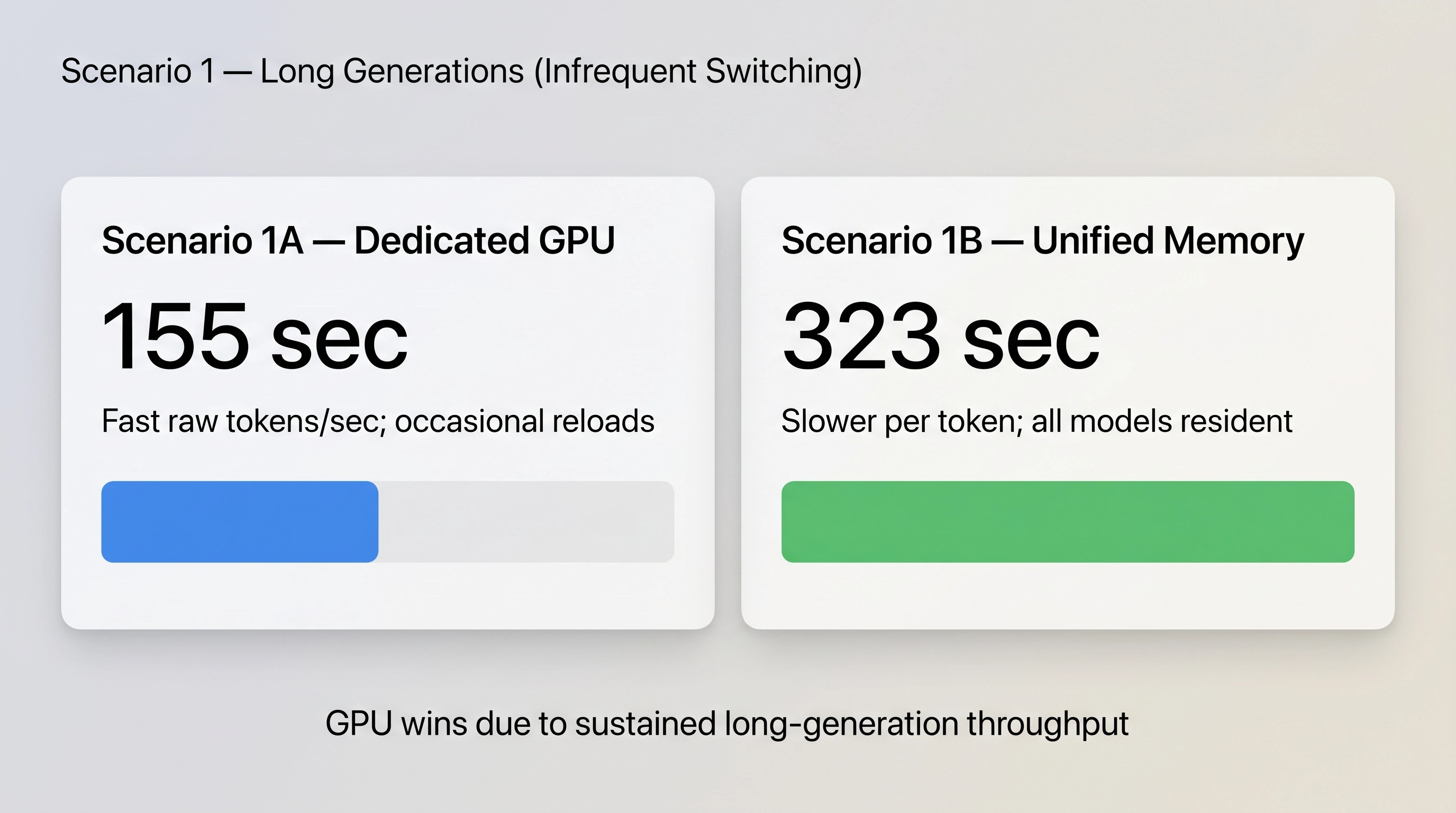
Scenario 1 Result: For long, sustained generations, the dedicated GPU still wins (155 sec vs. 323 sec), because the large generation sizes give the raw compute speed enough time to outweigh the switching pauses.
Secnario 2: Short bursts; frequent model switching (multi-tool single agent or multiple agents)
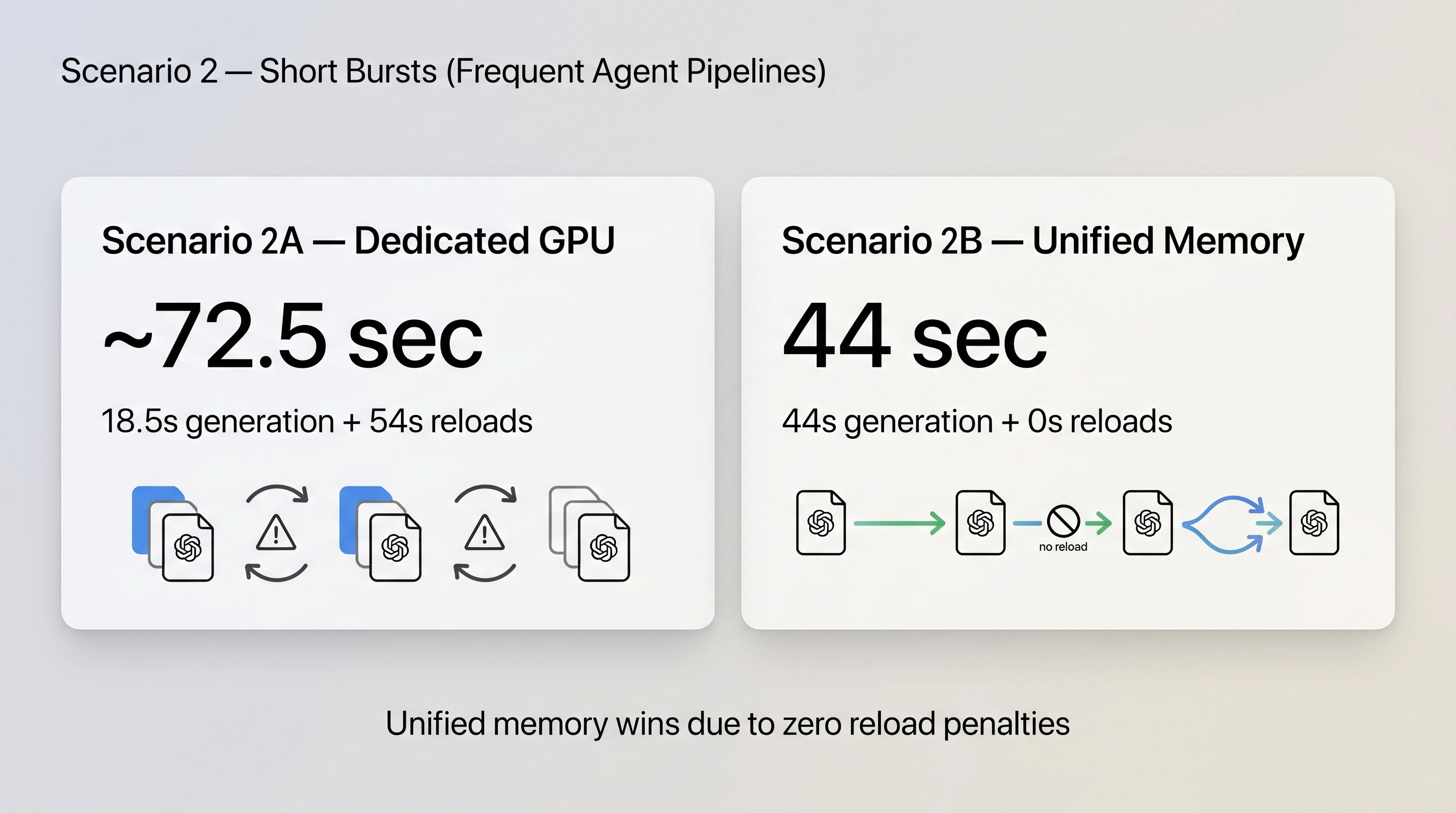
Scenario 2 Result: Due to frequent model switching and reload penalties, the GPU takes ~72.5 sec, while unified memory completes the same work in 44 sec—a ~28.5 second advantage purely from avoiding reload penalties. If the scenario is repeated frequently or non-stop, this becomes a significant advantage to the Unified Memory setup, especially for multi-agent workflows where multiple models can be used simultaneously by different agents.
Detailed Breakdown: Scenario 1 (Long Generations & Intermittent Switching)
- Scenario 1A (Dedicated GPU):
- Sequence: Model A (29s) → Load B (8s) → Model B (17s) → Load C (10s) → Model C (30s) → Load A (9s) → Model A (11s) → Load B (8s) → Model B (33s)
- Total Wall‑Clock Time: 155 sec
- Scenario 1B (Unified Memory):
- Sequence: Model A (80s) → Model B (45s) → Model C (75s) → Model A (32s) → Model B (91s)
- Total Wall‑Clock Time: 323 sec
Detailed Breakdown: Scenario 2 (Short Bursts & Agent Pipelines)
Real agent pipelines make lots of short calls, switching models frequently:
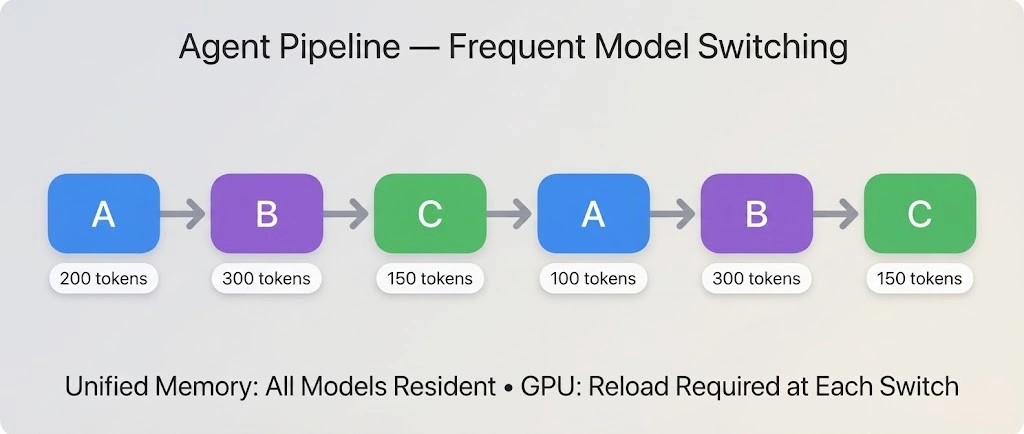
Scenario 2A — Dedicated GPU
- Speeds: A: 70 tok/s | B: 60 tok/s | C: 70 tok/s | Reload: 9 sec
- Generation Time: 2.9 + 5 + 2.1 + 1.4 + 5 + 2.1 ~ 18.5 sec
- Reload Time: Initial load (9s) + 5 switches (5 × 9s = 45s) = 54 sec
- Total Wall‑Clock Time: 18.5 + 54 ~ 72.5 sec
Scenario 2B — Unified Memory
- Speeds: A: 30 tok/s | B: 25 tok/s | C: 30 tok/s | Reloads: 0 sec
- Generation Time: 6.7 + 12 + 5 + 3.3 + 12 + 5 = 44 sec
- Reload Time: 0 sec
- Total Wall‑Clock Time: 44 sec
Takeaway
- Scenario 1 (long generations): GPU wins
- Scenario 2 (short bursts): Unified memory wins
- Workload shape matters more than raw tokens/sec
Note: our comparisons were based on a 5070TI 16GB GPU vs Unified Memory architecture. This may be considered “unfair” as the 5070 is a “mid-tier” GPU, vs. typically “higher-end” unified memory platforms. Here is a three-way comparison between the 5070 (16GB), a 5090 (32GB), and the Unified architectures:
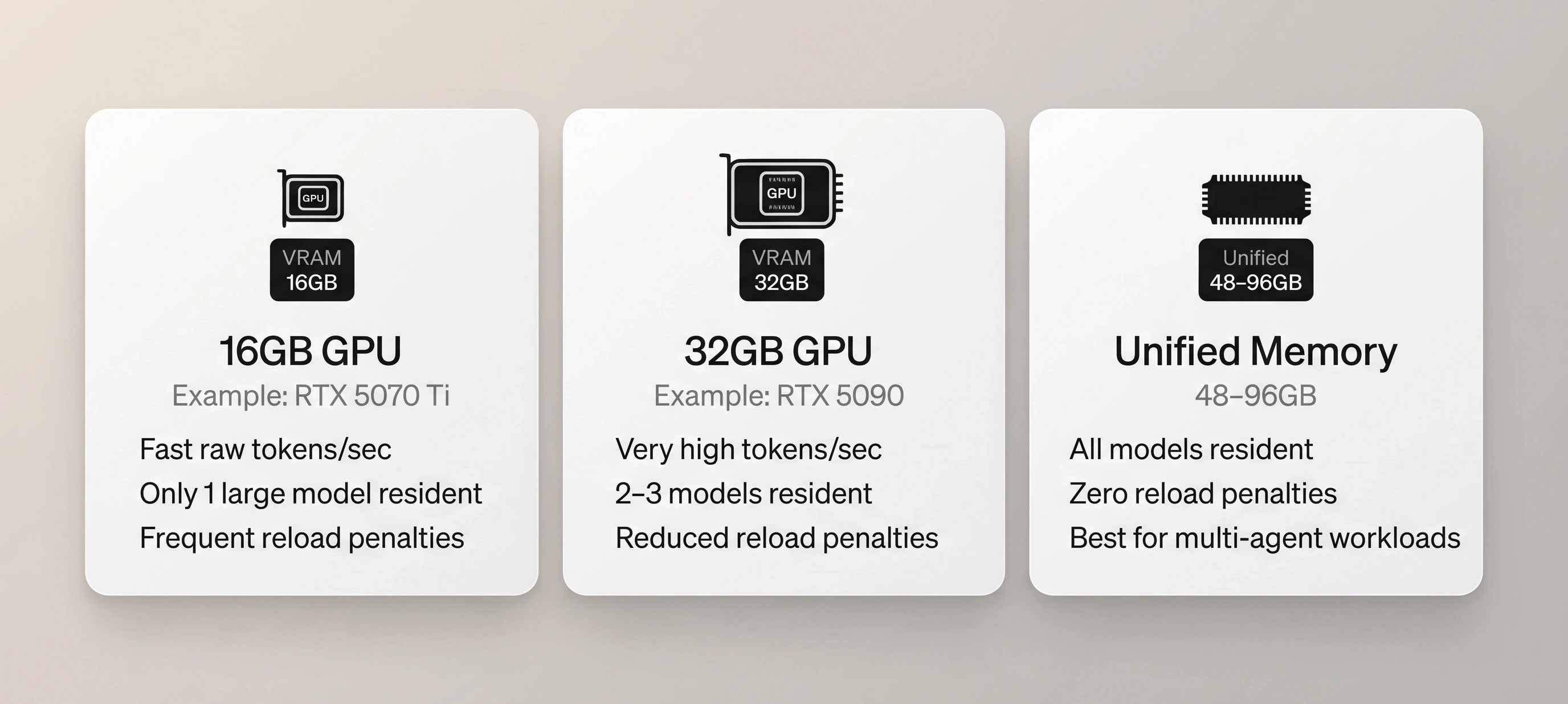
This comparison doesn’t include numerical evaluation, but shows that the 5090 can potentially keep more than one “small” model resident in-memory (essentially the same memory footprint as two 5070 GPUs) and could achieve the token/second speed advantage of the GPU while reducing the load penalty by keeping more models in-memory (or having more room for context to support multiple simultaneous requests).
🎯 Find Your Own Break-Even Point
Before buying hardware, gather five numbers:
- The models involved — how many, and what size class.
- Tokens per invocation — average call size.
- Call frequency — how often each model gets invoked.
- Model-load time on your current setup.
- Whether other processes share the same models.
Plug them into the effective throughput formula to answer:
“If my models switch more than X times per hour, does unified memory complete more total jobs per hour than a GPU?”
This is the only version of “which machine should I buy?” worth trusting.
🧭 The Decision Table
| If your workload is… | Choose | Because |
|---|---|---|
| One model, sustained, heavy use (e.g., single coding agent running all day) | Dedicated GPU (VRAM) | Raw speed wins when there’s nothing to switch between |
| A pipeline rotating 2–4 models per task (plan → research → code → review) | Unified memory | Avoids reload penalties between steps |
| Serving multiple clients/bots requesting different models | Unified memory or a server-style build | Model residency matters more than raw speed — see Building a Local AI Server |
| Short bursts, infrequent use, budget-constrained | Whatever you already own | Architecture advantage is minimal below a certain volume |
| Not sure yet | Model your actual workload | Use the break-even math above |
⚠️ Common Hardware Mistakes
- Buying VRAM for a pipeline workload: If your pipeline needs three different models resident at once, a 32GB card will still force reload penalties.
- Buying unified memory for a single heavy workload: If you’re running one model hard all day with no switching, a dedicated GPU simply outruns it.
- Ignoring contention: Multiple consumers (agents, Discord bots, background tools) fighting for VRAM turn a workstation choice into a server architecture problem. See Building a Local AI Server.
- Assuming the newest GPU automatically wins: More raw compute doesn’t help if your primary bottleneck is model-loading overhead.
🛡️ The Busy Human Safety Check
Before buying:
- Model your actual workload using real usage data rather than shopping off benchmark charts.
- Wait for confirmed RTX Spark specs if your timeline allows.
- Reassess your requirements after factoring in quantization and Mixture of Experts (MoE) models, as both shrink the hardware you actually need.
Next Steps
- Serving multiple clients or bots:
Building a Local AI Server - Fit more model into less memory:
Understanding Quantization · Mixture of Experts (MoE) Explained - Back to fundamentals:
Local AI Setup for Busy Humans